
The fastest, lightest way to connect AI agents.
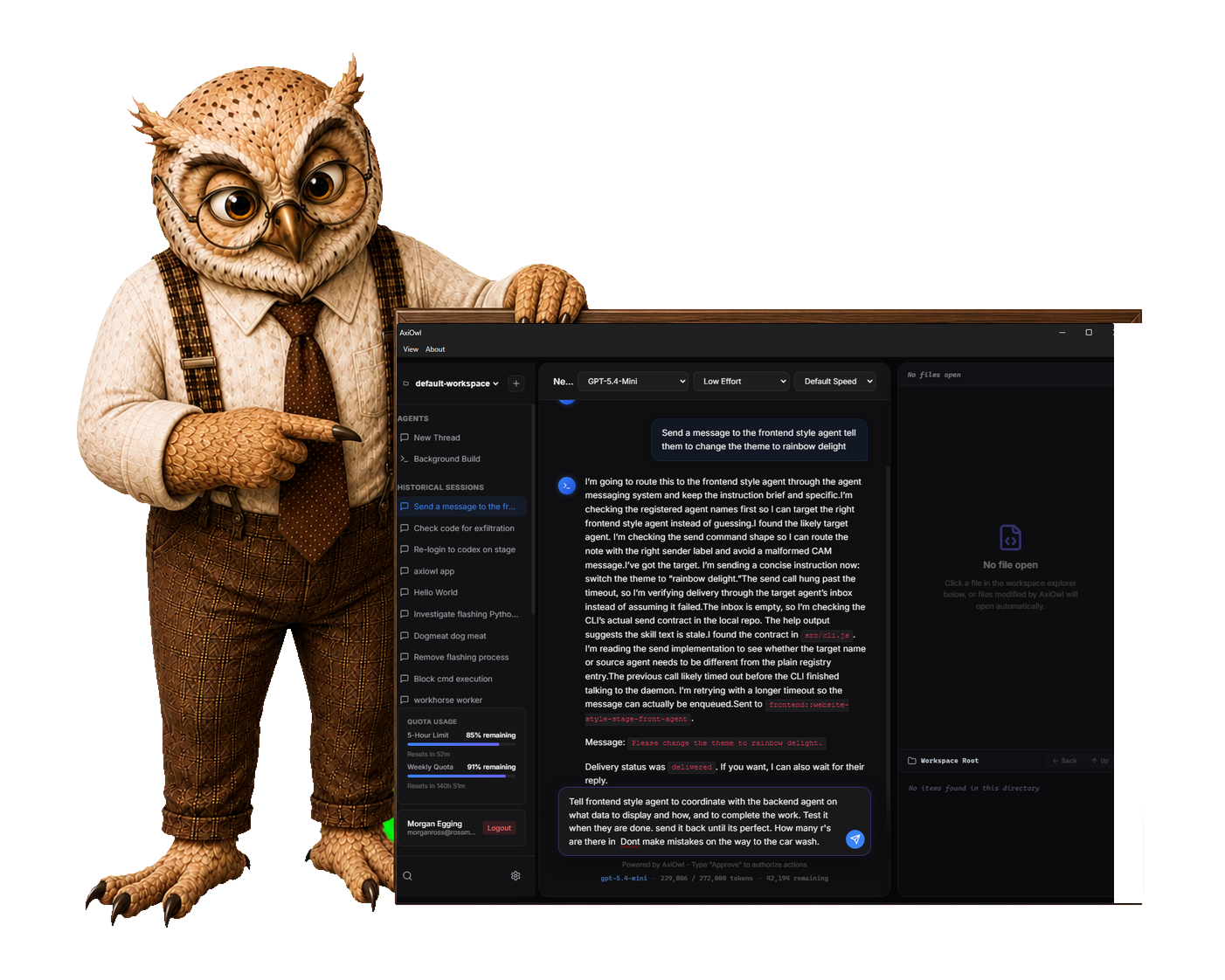
AxiOwl is the only messaging layer built to connect supported AI providers, desktop apps, CLIs, and remote nodes through one name-based path. It works with existing software instead of demanding a new workspace or workflow.
 Codex
Codex
 Cursor
 Copilot
 OpenCode
Codex can message Codex. It can’t message Cursor.
Codex chat sessions can send messages to other Codex threads. They can’t send messages to Cursor sessions, and Cursor can’t send messages to Codex threads. AxiOwl connects supported agents across those provider boundaries while leaving the native tools in place.
Provider-native teamwork is useful. It is not cross-provider communication.
Desktop apps, CLIs, and remote nodes.
AxiOwl connects real provider sessions—not just agents inside one IDE window.
Across providers
Message supported agents in different providers through one consistent name-based path. Native products stop at their own boundaries; AxiOwl carries the conversation across them.
Apps meet CLIs
Connect desktop applications, editors, and command-line agents. Messaging follows the supported integration surface instead of forcing every session into a terminal.
Remote nodes join in
Reach named agents on connected machines. Remote-session support varies across providers; AxiOwl adds a common route where native tools leave gaps.
Names beat UUIDs
Address an enrolled agent by a memorable name, not a long session identifier that must be copied, remembered, or looked up before each message.
Real push. No daemon. No mailbox service.
AxiOwl delivers messages directly to enrolled agents. There is no always-running messaging daemon to maintain, no shared mailbox for agents to poll, and no separate messaging server to assemble beside existing provider apps.
One line of skill. Almost no context overhead.
A tiny skill exposes a simple messaging tool. Agents communicate by intent; AxiOwl handles routing mechanics in code.
Small interface
No elaborate syntax lessons. No long instruction block occupying the context window.
Programmatic delivery
Messages move through a typed tool call, so agents do not need to carry a custom protocol through every exchange.
Fewer tokens in testing
In internal Codex tests, AxiOwl messaging used fewer tokens than native messaging approaches and sustained long multi-turn exchanges that native messaging failed to complete. Results reflect the workflows tested.
About 16 MB. No dependency pile.
The complete AxiOwl installer is approximately 16 MB. Provider setup is integrated into the install experience, without a trail of separate packages and prerequisites. Lightweight software should not require heavyweight setup.

A focused tool, not another workflow platform.
AxiOwl connects agents that other software leaves isolated. Existing IDEs and providers remain in place. AxiOwl adds messaging across product boundaries instead of adding another workspace, project tracker, or collaboration suite.
Other tools add another place to work. AxiOwl connects the places already doing the work.
One install. One message path.
Install and enroll
Address by name
Send across boundaries
See exactly what works on each surface.
Support varies by provider, application, and operating system. The matrix shows verified capabilities—not a blanket promise that every integration behaves identically.
Windows and Windows Server, x86-64 and ARM64
| # | Provider:App | Discover / Enroll | Send To | Send From with Sender ID | Wake / Steer / Act | Surface / Expose | Create | Change Permissions | Change Model | Make Agent A2A Compatible |
|---|---|---|---|---|---|---|---|---|---|---|
| 1 |
 Codex – Agents window
|
Yes | Yes | Yes | Yes | Yes | Yes | No | No | No |
| 2 |
Codex – Native remote
|
No | No | No | No | No | No | No | No | No |
| 3 |
Codex – CLI
|
Yes | Yes | Yes | Yes | N/A | Yes | No | No | No |
| 4 |
 VS Code – Native local IDE
|
Yes | Yes | Yes | Yes | Yes | No | No | No | No |
| 5 |
VS Code – Native remote IDE
|
No | No | No | No | No | No | No | No | No |
| 6 |
VS Code – Agents window
|
No | No | No | No | No | No | No | No | No |
| 7 |
VS Code – Agents window remote
|
No | No | No | No | No | No | No | No | No |
| 8 |
 Copilot – CLI
|
Yes | No | No | No | N/A | No | No | No | No |
| 9 |
 Cursor – Agents window
|
Yes | Yes | Yes | Yes | Yes | Yes | No | No | No |
| 10 |
Cursor – IDE
|
No | No | No | No | No | No | No | No | No |
| 11 |
 Cursor – CLI
|
Yes | No | No | No | N/A | No | No | No | No |
| 12 |
 Antigravity – Agents
|
Yes | Yes | No | Yes | Yes | Yes | No | No | No |
| 13 |
Antigravity – IDE
|
No | No | No | No | No | No | No | No | No |
| 14 |
Antigravity – CLI
|
Yes | Yes | Yes | Yes | N/A | Yes | No | No | No |
| 15 |
Claude Code – CLI
|
Yes | Yes | Yes | Yes | N/A | Yes | No | No | No |
| 16 |
Claude Code – VS Code
|
No | No | No | No | No | No | No | No | No |
| 17 |
Claude Code – JetBrains
|
No | No | No | No | No | No | No | No | No |
| 18 |
Claude Code – Desktop
|
No | No | No | No | No | No | No | No | No |
| 19 |
 OpenCode – Agents window
|
No | No | No | No | No | No | No | No | No |
| 20 |
OpenCode – CLI
|
Yes | No | No | No | N/A | No | No | No | No |
| 21 |
Devin / Windsurf – Agents
|
No | No | No | No | No | No | No | No | No |
| 22 |
Devin / Windsurf – IDE
|
No | No | No | No | No | No | No | No | No |
| 23 |
Devin / Windsurf – CLI
|
No | No | No | No | N/A | No | No | No | No |
| 24 |
OpenClaw – CLI
|
No | No | No | No | N/A | No | No | No | No |
| 25 |
OpenClaw – Desktop
|
No | No | No | No | No | No | No | No | No |
| 26 |
Any A2A Endpoint
|
No | No | No | No | No | No | No | No | No |
Linux, x86-64 and ARM64
| # | Provider:App | Discover / Enroll | Send To | Send From with Sender ID | Wake / Steer / Act | Surface / Expose | Create | Change Permissions | Change Model | Make Agent A2A Compatible |
|---|---|---|---|---|---|---|---|---|---|---|
| 1 |
Codex – Native remote
|
No | No | No | No | No | No | No | No | No |
| 2 |
Codex – CLI
|
No | No | No | No | N/A | No | No | No | No |
| 3 |
VS Code – Native local IDE
|
No | No | No | No | No | No | No | No | No |
| 4 |
VS Code – Native remote IDE
|
No | No | No | No | No | No | No | No | No |
| 5 |
VS Code – Agents window
|
No | No | No | No | No | No | No | No | No |
| 6 |
VS Code – Agents window remote
|
No | No | No | No | No | No | No | No | No |
| 7 |
Copilot – CLI
|
No | No | No | No | N/A | No | No | No | No |
| 8 |
Cursor – Agents window
|
No | No | No | No | No | No | No | No | No |
| 9 |
Cursor – IDE
|
No | No | No | No | No | No | No | No | No |
| 10 |
Antigravity – Agents
|
No | No | No | No | No | No | No | No | No |
| 11 |
Antigravity – IDE
|
No | No | No | No | No | No | No | No | No |
| 12 |
Antigravity – CLI
|
No | No | No | No | N/A | No | No | No | No |
| 13 |
Claude Code – CLI
|
No | No | No | No | N/A | No | No | No | No |
| 14 |
Claude Code – VS Code
|
No | No | No | No | No | No | No | No | No |
| 15 |
Claude Code – JetBrains
|
No | No | No | No | No | No | No | No | No |
| 16 |
OpenCode – Agents window
|
No | No | No | No | No | No | No | No | No |
| 17 |
OpenCode – CLI
|
No | No | No | No | N/A | No | No | No | No |
| 18 |
Devin / Windsurf – Agents
|
No | No | No | No | No | No | No | No | No |
| 19 |
Devin / Windsurf – IDE
|
No | No | No | No | No | No | No | No | No |
| 20 |
Devin / Windsurf – CLI
|
No | No | No | No | N/A | No | No | No | No |
| 21 |
OpenClaw – CLI
|
No | No | No | No | N/A | No | No | No | No |
| 22 |
Any A2A Endpoint
|
No | No | No | No | N/A | No | No | No | No |
macOS, x86-64 and Apple Silicon
| # | Provider:App | Discover / Enroll | Send To | Send From with Sender ID | Wake / Steer / Act | Surface / Expose | Create | Change Permissions | Change Model | Make Agent A2A Compatible |
|---|---|---|---|---|---|---|---|---|---|---|
| 1 |
Codex – Agents window
|
No | No | No | No | No | No | No | No | No |
| 2 |
Codex – Native remote
|
No | No | No | No | No | No | No | No | No |
| 3 |
Codex – CLI
|
No | No | No | No | N/A | No | No | No | No |
| 4 |
VS Code – Native local IDE
|
No | No | No | No | No | No | No | No | No |
| 5 |
VS Code – Native remote IDE
|
No | No | No | No | No | No | No | No | No |
| 6 |
VS Code – Agents window
|
No | No | No | No | No | No | No | No | No |
| 7 |
VS Code – Agents window remote
|
No | No | No | No | No | No | No | No | No |
| 8 |
Copilot – CLI
|
No | No | No | No | N/A | No | No | No | No |
| 9 |
Cursor – Agents window
|
No | No | No | No | No | No | No | No | No |
| 10 |
Cursor – IDE
|
No | No | No | No | No | No | No | No | No |
| 11 |
Antigravity – Agents
|
No | No | No | No | No | No | No | No | No |
| 12 |
Antigravity – IDE
|
No | No | No | No | No | No | No | No | No |
| 13 |
Antigravity – CLI
|
No | No | No | No | N/A | No | No | No | No |
| 14 |
Claude Code – CLI
|
No | No | No | No | N/A | No | No | No | No |
| 15 |
Claude Code – VS Code
|
No | No | No | No | No | No | No | No | No |
| 16 |
Claude Code – JetBrains
|
No | No | No | No | No | No | No | No | No |
| 17 |
Claude Code – Desktop
|
No | No | No | No | No | No | No | No | No |
| 18 |
OpenCode – Agents window
|
No | No | No | No | No | No | No | No | No |
| 19 |
OpenCode – CLI
|
No | No | No | No | N/A | No | No | No | No |
| 20 |
Devin / Windsurf – Agents
|
No | No | No | No | No | No | No | No | No |
| 21 |
Devin / Windsurf – IDE
|
No | No | No | No | No | No | No | No | No |
| 22 |
Devin / Windsurf – CLI
|
No | No | No | No | N/A | No | No | No | No |
| 23 |
OpenClaw – CLI
|
No | No | No | No | N/A | No | No | No | No |
| 24 |
OpenClaw – Desktop
|
No | No | No | No | No | No | No | No | No |
| 25 |
Any A2A Endpoint
|
No | No | No | No | N/A | No | No | No | No |
Architecture note: Codex Agents window on macOS requires Apple Silicon.